An Arduino that plays Chrome's dino game by itself. A photoresistor reads the screen, a servo hits the space bar, and it calibrates itself to any room in half a second.
- Trigger threshold, of the calibrated baseline
- 75%
- Servo key press
- 120 ms
- Cooldown between jumps
- 300 ms
Problem
- Beat Chrome's offline T-Rex game with hardware alone, using a sensor to watch the screen and a servo to press the key, with no software hooks.
- Stay reliable across screen brightness and room lighting.
Approach
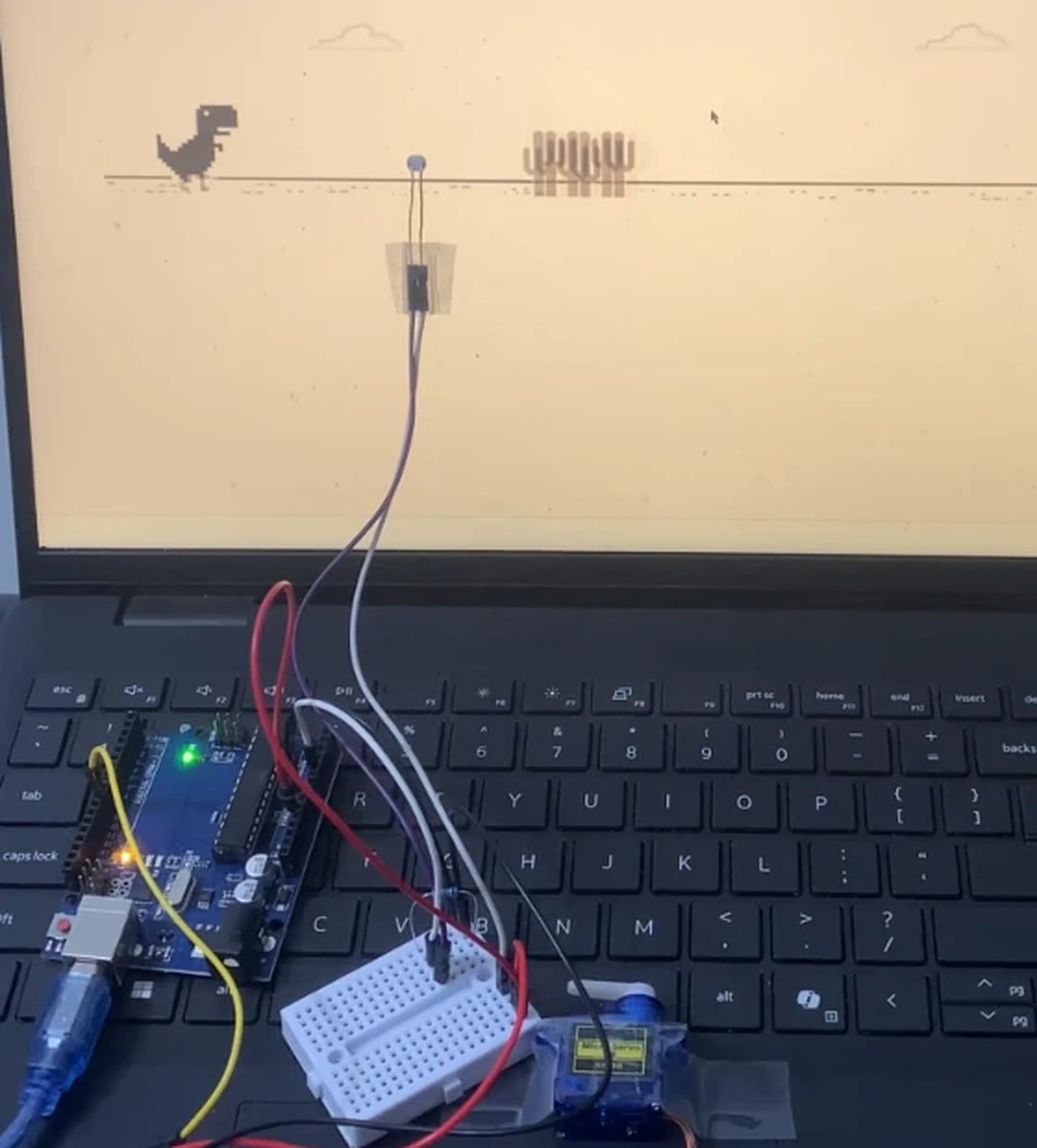
- Built a photoresistor and 10 kΩ voltage divider into A0, aimed at a fixed point ahead of the dinosaur and shielded from glare.
- Mounted a servo over the space bar on pin 9, swinging from 180° to 140° to tap the key.
- Averaged 50 readings at startup and set the trigger at 75% of the baseline, then tuned timing through testing.
Result
- It jumps cacti on its own in light mode, with no software hooks and nothing installed on the computer.
- Next upgrades are a second sensor for speed-adaptive timing, a second servo for ducking, and automatic night-mode detection.
Overview
An Arduino Uno R3 plays Chrome's dino game with no software connection to it. A photoresistor taped to the screen watches the spot just ahead of the dinosaur. When a dark cactus crosses it, a servo taps the space bar.
Parts: Arduino Uno R3, photoresistor, 10 kΩ resistor, servo, breadboard, jumper wires, tape and a paper light shield.
Sensing
The photoresistor and the 10 kΩ resistor form a voltage divider into pin A0. A cactus raises the photoresistor's resistance and drops the reading, and that drop is the trigger. A paper shroud blocks glare and ambient light so the signal stays clean.
Actuation
The servo sits above the space bar on pin 9. A swing from 180° (rest) to 140° (press) is enough to hit the key.
Calibration and control
At startup the Arduino averages 50 readings in about 0.5 s to learn the blank background, then sets the trigger at 75% of that baseline. No hard-coded values, so it adapts to any screen brightness and room lighting.
When the reading falls below the threshold, the servo presses for 120 ms and returns, then waits 300 ms so one obstacle never causes a double jump. The multiplier, angle, press time and cooldown were tuned through testing, with the baseline and threshold printed to the Serial Monitor for debugging.
Next steps
- A second sensor would measure obstacle speed, so the jump can be timed to the game's pace.
- A second servo would let it duck under birds.
- Detecting the night-mode color inversion would flip the trigger logic automatically.